
(See Steps) (7x4 = 28 points) Use the "ProstateCancer" dataset. The data are from n = 97 prostate cancer patients. The variables are: Y = lnPSA; natural
Question: ( 7x4 = 28 points ) Use the "ProstateCancer" dataset. The data are from n = 97 prostate cancer patients. The variables are:
Y = lnPSA; natural log of the prostate specific antigen value, a blood chemistry measurement affected by the presence of prostate cancer
X 1 = lnCanVol; natural log of the cancer volume (cc)
X 2 = Weight; prostate weight (gm)
- Create scatterplots of Y versus X 1 and Y versus X 2 and discuss noteworthy features of the data and the relationships.
-
Do a multiple regression to predict
Y
using
X
1
and
X
2
as predictors. Store Cook's Di and DFFITS values (we will look at those in the next part). To store these in Minitab, use the Storage button within the regression dialog box and select then from under the Diagnostic measures. Complete the table below with values.
Predictor Coefficient Value Standard Error p -value lnCanVol Weight -
The table below is a list of the "Unusual Observations" that Minitab gives for the regression done in part (b). Discuss this list in terms of what data difficulties (or potential difficulties) may be indicated. As an aid to understanding why some observations may have been marked
X
, plot
X
1
versus
X
2
. Use that plot and the plots done in part (a) to guide your discussion.
Obs lnPSA Fit Resid Std Resid
5 0.370 2.003 -1.633 -2.11 R
18 1.490 3.133 -1.643 -2.13 R
32 2.010 2.882 -0.872 -2.78 R X
69 2.960 1.299 1.661 -2.18 R
95 5.140 3.552 1.588 2.07 R
96 5.480 3.571 1.909 2.48 R
97 5.580 4.025 1.555 2.04 R
R Large residual
X Unusual X - Concerning the regression done in part (b), determine which data point(s) may have unusually large values for both the DFFITS values and the Cook's D i values. For DFITS use the "greater than 2√((p+1)/(n–p–1)) in absolute value" standard and for Cook's Di use a "greater than 1" standard. Delete any such data points from the dataset. Describe which observation(s) you're deleting and explain why you're doing the deletion(s).
-
Do the multiple regression again using the new dataset after the deletion(s) of part (d). [Minitab: Data > Subset Worksheet.] Complete the table below with the resulting values.
Predictor Coefficient Value Standard Error p -value lnCanVol Weight
Comment on the differences between the results in this part and part (b). The main point here is that one or two points may influence matters so much that their presence or absence can change conclusions. - For the data and model of part (e), create a plot of residuals versus fits. Discuss whether any difficulties with the model or the data are indicated.
- Discuss whether you think any further data points should be deleted. Indicate which observations you would delete, if any, or say why you don’t think any more points should be deleted. [Hint: repeat what you did before in part (e); if there are no observations that exceed the thresholds for DFFITS or Cook’s distance then it’s unlikely any further data points should be deleted, but to be sure you can delete the observation with the largest Cook’s distance and see what effect this has on the values in part (e).]
Deliverable: Word Document 
![[Solution Library] (15x3 = 45 points) Use](/images/solutions/MC-solution-library-75966.jpg "[Solution Library] (15x3 = 45 points) Use the") [Solution Library] (15x3 = 45 points) Use the "Poverty" dataset. This
[Solution Library] (15x3 = 45 points) Use the "Poverty" dataset. This
![[Step-by-Step] In a simply inductive AC circuit,](/images/solutions/MC-solution-library-75967.jpg "[Step-by-Step] In a simply inductive AC circuit, L = 50.0mH and the") [Step-by-Step] In a simply inductive AC circuit, L = 50.0mH and the
[Step-by-Step] In a simply inductive AC circuit, L = 50.0mH and the
![[Solution] Scenario: A statistics professor recently changed](/images/solutions/MC-solution-library-75968.jpg "[Solution] Scenario: A statistics professor recently changed textbooks.") [Solution] Scenario: A statistics professor recently changed textbooks.
[Solution] Scenario: A statistics professor recently changed textbooks.
![[Solution] You are in charge of a](/images/solutions/MC-solution-library-75969.jpg "[Solution] You are in charge of a clinical trial that will be") [Solution] You are in charge of a clinical trial that will be
[Solution] You are in charge of a clinical trial that will be
![[Solved] You have been researching on the](/images/solutions/MC-solution-library-75970.jpg "[Solved] You have been researching on the effects of life span") [Solved] You have been researching on the effects of life span
[Solved] You have been researching on the effects of life span
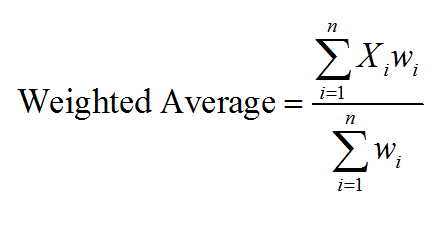 Use this Weighted Average Calculator - MathCracker.com