Final Project Plan— Part 2 (Analysis of Inferential Statistics) Part 2 of the Final Project is a data
Final Project Plan— Part 2 (Analysis of Inferential Statistics)
Part 2 of the Final Project is a data analysis of an assigned dataset, comprising the following statistical techniques:
For each of these techniques, you need to state your research question (i.e. "Are males more likely to be smokers than females?" "Is there a significant difference between the mean age of Manhattan and Brooklyn residents? Can we reject the null hypothesis or do we fail to reject?" "What is the strength of the relationship between x and y and is this relationship linear?"), and write up your results in the form of a statement. The writeup for each technique should be about a paragraph. Be sure to include all relevant output from SPSS.
-
Chi Square—Test for Independence
(Covered in chapter 11, assignment #7)
Background and Requirements
Determine if two categorical (nominal) variables are related.
Requires two categorical variables, with two or more categories (groups) for each variable. -
Independent Samples (Difference between Two Means
)
(Covered in chapter 9, assignment #10)
Background and Requirements
Determine if there is a statistically significant difference in the mean score, on some continuous (i.e. quantitative) variable, for two different groups in a categorical (nominal) variable.
Requires one categorical variable with two groups, and one quantitative variable. -
One-Way ANOVA
(Covered in chapter 12, assignment #12)
Background and Requirements
Determine if there is a statistically significant difference in the mean score, on some continuous (i.e. quantitative) variable, for three or more groups in a nominal or ordinal variable.
Requires one categorical variable with three or more groups, and one quantitative variable. -
Two-Way ANOVA
(Covered in chapter 12, assignment #13)
Background and Requirements
Determine if there is an interaction, as well as individual, effects on difference in mean value for data broken into groups using two variables.
Requires one categorical variable with three or more groups, one categorical variable with two groups, and one quantitative variable.
Decision and Conclusions
Based on our p-values from the Sig. column in the Tests of Between-Subjects Effects , we can conclude that neither of our independent variables, either individually or as part of an interaction, have a significant effect on crime rate in North Carolina counties. This conclusion is reiterated by the fact that all of the confidence intervals in the Multiple Comparisons table of the difference in means between the groups contain zero, indicating that there is the possibility that the difference in means is zero.
- Correlations (Covered in chapter 10, assignment #14)
Background and Requirements
Determine if there is a statistically significant linear relationship between two quantitative variables, whether the relationship is positive or negative, and what the strength of the relationship is.
Requires two quantitative variables.
Generated User Interface (GUI) Instructions
- Graphs > LegacyDialog > Scatter/Dot
- Click on Simple Scatter . Click Define .
- Move your two variables into the Y Axis and X Axis boxes. (It doesn’t matter which variable goes in which box.)
- Click on Title . Enter a title for your scatterplot. (i.e. Crime Rate by Population Density.)
- Hit Paste and run.
- Analyze > Correlate > Bivariate
- Select the variables you wish to find correlation of to the Variables box. (You can add more than two variables here.)
- Make sure that the Pearson box and the 2 tail box have a cross in them. (This is to ensure that you are not making a prediction about whether the correlation is positive or negative.)
- Click on the Options button. For Missing Values , click on Exclude cases pairwise box.
- Hit Paste and run.
Syntax
*Correlations*
GRAPH
/SCATTERPLOT(BIVAR)= density WITH crmrte
/MISSING=LISTWISE
/TITLE= 'Crime Rate by Population Density' .
CORRELATIONS
/VARIABLES= crmrte density
/PRINT=TWOTAIL SIG
/MISSING=PAIRWISE.
Interpreting Results

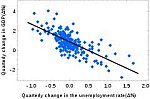
Begin by observing the scatterplot. Do the plotted points show a linear relationship? If so continue. (In this case, the relationship is generally linear, so we can continue.)
| Correlations | |||
| crimes committed per person | people per square mile | ||
| crimes committed per person | Pearson Correlation | 1 | .732 |
| Sig. (2-tailed) | .000 | ||
| N | 89 | 89 | |
| people per square mile | Pearson Correlation | .732 | 1 |
| Sig. (2-tailed) | .000 | ||
| N | 89 | 89 | |
The Correlations table gives you the correlation between your variables as the Pearson correlation , as well as the significance level, as the Sig. (2-tailed) value. In our case, the p-value of .000 shows that the relationship is linear and significant. The Pearson correlation of .732 shows a pretty strong positive relationship.
Decision and Conclusions
An observation of the scatterplot shows a positive linear relationship between the two variables. This observation is supported by a correlation of .732, which is significant at a 95% confidence level.
- Extra Credit: Multiple Regression Analysis
(Covered in chapter 10, assignment #16)
Generated User Interface (GUI) Instructions
Syntax
Interpreting Results
Decision and Conclusions
Deliverable: Word Document

-
![[See Solution] I n-Class Assignment 1 .](data:image/svg+xml,%3Csvg%20xmlns='http://www.w3.org/2000/svg'%20viewBox='0%200%20150%20150'%3E%3C/svg%3E "[See Solution] I n-Class Assignment 1 . Using an alpha of 0.05,") [See Solution] I n-Class Assignment 1 . Using an alpha of 0.05,
[See Solution] I n-Class Assignment 1 . Using an alpha of 0.05,
-
[Step-by-Step] Calculate a one-way chi square and interpret the results
-
[Steps Shown] Multiple Regression Lab Instructions Open the Multiple
-
[Solved] Open the Advanced Data Analysis Blocks file from the
-
[Solution] Factor Analysis instructions: Choose any six variables
-
Correlation Coefficient Significance Calculator using p-value - MathCracker.com
![[See Solution] I n-Class Assignment 1 .](/images/solutions/MC-solution-library-82795.jpg "[See Solution] I n-Class Assignment 1 . Using an alpha of 0.05,")
![[Step-by-Step] Calculate a one-way chi square and](/images/solutions/MC-solution-library-82796.jpg "[Step-by-Step] Calculate a one-way chi square and interpret the results")
![[Steps Shown] Multiple Regression Lab Instructions Open](/images/solutions/MC-solution-library-82797.jpg "[Steps Shown] Multiple Regression Lab Instructions Open the Multiple")
![[Solved] Open the Advanced Data Analysis Blocks](/images/solutions/MC-solution-library-82798.jpg "[Solved] Open the Advanced Data Analysis Blocks file from the")
![[Solution] Factor Analysis instructions: Choose any six](/images/solutions/MC-solution-library-82799.jpg "[Solution] Factor Analysis instructions: Choose any six variables")