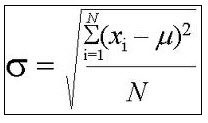
8.1. ANOVA Logic: Sum of Squares - Criterion: Calculate the sum of squares. - Data: The within-group (error)
8.1. ANOVA Logic: Sum of Squares
- Criterion: Calculate the sum of squares.
- Data: The within-group (error) sum of squares is 108.45 and the between-group sum of squares is 48.68.
- Instruction: Calculate the sum of squares total.
8.2. ANOVA Logic: From Mean Squares to \(F\)
- Criterion: Calculate F from mean squares values.
- Data: \(M S_{\mathrm{BG}}=80\) and \(M S_{\mathrm{E}}=20\).
- Instruction: Answer this: What is \(F\) ?
8.3. ANOVA Summary Table
- Criterion: Analyze the results of an ANOVA summary table and report findings.
- Data: ANOVA summary table:

- Instruction: Answer questions a-d using the ANOVA summary table.
- How many groups participated?
- How many participants were in each group (assuming equal number of participants per group)?
- Refer to the \(F\) table. What is the critical value of \(F(4,45)\) at the .01 level?
- Given a significant result at the .01 level, how confident are you \((0 \%\) to \(100 \%)\) that rejecting the null hypothesis is not due to chance? Additionally, what is the probability that you made a Type 1 error?
8.4. One-Way ANOVA in SPSS
- Criterion: Calculate an ANOVA in SPSS.
- Data: Tyrone is testing out dye strength after washing dyed fabric for his new fabric line. He dyes his fabrics blue, green, and yellow and washes the fabric one time. The following are the dye strength results for 10 pieces of fabric in each color after one wash:

- Instruction: Complete the following steps:
a Open SPSS and open a New DataSet.
b. Click the Variable View tab at the bottom and enter Color and enter DyeStrength as the variables. Click the Values box for the Color row and define 1 as blue, 2 as green, and 3 as yellow.
c. Enter the data. For example, type 1 in row 1 under Color and type 98 in row 1 under DyeStrength.
Continue typing in all the data. Please remember to change to 2 in column 1 when the color is green and change to 3 in column 1 when the color is yellow.
- In the Toolbar, click Analyze, select Compare Means, and then select One-Way ANOVA.
c. Select DyeStrength and then click Arrow to send it over to the Dependent List box.
s. Select Color and then click Arrow to send it over to the Factor box.
g. Click OK and copy and paste the output below.
8.5. One-Way ANOVA Results in APA Style
- Criterion: Report ANOVA results in APA format.
- Data: Use the DyeStrength data from Problem Set 8.4.
- Instruction: Complete the following:
- State the null hypothesis.
-
Report your results in APA format (as you might see them reported in a journal article).
8.6. Tukey HSD Test in SPSS
- Criterion: Calculate post hoc analyses in SPSS.
- Data: Use SPSS data from Problem Set 8.4.
- Instruction: Complete the following steps:
. In the Toolbar, click Analyze, select Compare Means, and then select One-Way ANOVA.
b. Select DyeStrength, then click Arrow to send it over to the Dependent List box. - Select Color, then click Arrow to send it over to the Factor box.
a Click Post Hoc and then check the box Tukey. Click Continue.
c. Click OK and copy and paste the output to the Word document.
8.7. Tukey HSD Interpretation
- Criterion: Interpret Tukey HSD results from SPSS output.
- Data: Use your output from Problem Set 8.6.
- Instruction: Identify where significant differences exist at the .05 level between your colors.
Deliverable: Word Document

-
 (All Steps) Set 7.1: t Test with Related Samples - Criterion:
-
[See Solution] Data Analysis T-test and ANOVA A1) Do the two groups
-
[See Solution] Final Exam Instructions Review and complete the questions
-
[Solution Library] Task 1: Plot an error bar graph of the above data
-
[Solution Library] Stats Assignment Question 1 The total sleep time
-
Sample Standard Deviation Calculator - MathCracker.com
![[See Solution] Data Analysis T-test and ANOVA](/images/solutions/MC-solution-library-83021.jpg "[See Solution] Data Analysis T-test and ANOVA A1) Do the two groups")
![[See Solution] Final Exam Instructions Review and](/images/solutions/MC-solution-library-83022.jpg "[See Solution] Final Exam Instructions Review and complete the questions")
![[Solution Library] Task 1: Plot an error](/images/solutions/MC-solution-library-83023.jpg "[Solution Library] Task 1: Plot an error bar graph of the above data")
![[Solution Library] Stats Assignment Question 1 The](/images/solutions/MC-solution-library-83024.jpg "[Solution Library] Stats Assignment Question 1 The total sleep time")