
Do you ever watch an amazing tutorial on YouTube or a step-by-step how-to on Instagram, but give up halfway through because it feels like reading a textbook on mute? Don’t worry, you’re not alone.
If you’re an educator, coach, or creator, you know your audience wants to learn, but they also crave connection. They want to feel like someone is guiding them through the steps, not just dumping slides and captions on screen.
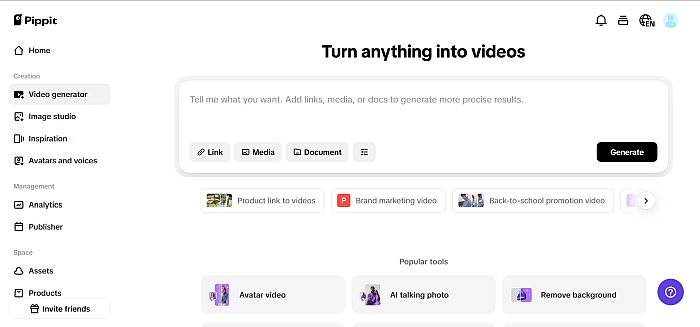
That’s where Pippit's AI voice generator steps in. With the right tools, you can layer a clear, friendly, human-sounding voiceover onto your text-heavy demos. No need for awkward self-recordings, clunky mics, or expensive freelancers — just type your script, choose a tone, and your tutorial talks back.
And for the visuals? Pair your narration with sharp, distraction-free cutouts using AI-powered technology, like the one in Pippit’s creative suite. Whether you’re building slides for a lesson or breaking down a product demo, your content will sound and look like it belongs on your audience’s favorite feed.
Why static how-tos aren’t enough anymore
A quick checklist for modern learners:
- Attention spans are shorter.
- Viewers scroll with sound on — especially on Reels, Shorts, and TikTok.
- Voice creates trust.
- A conversational tone keeps complex info from feeling intimidating.
When you turn your step-by-step into a conversation, you’re not just teaching — you’re building a relationship. That’s the magic of good narration.
What makes a voiceover “conversational”?
Not all voice-overs are created equal. A good AI narration feels like a friend explaining the steps, not a robot reading bullet points. Here’s what makes it work:
1. Match your style to your brand
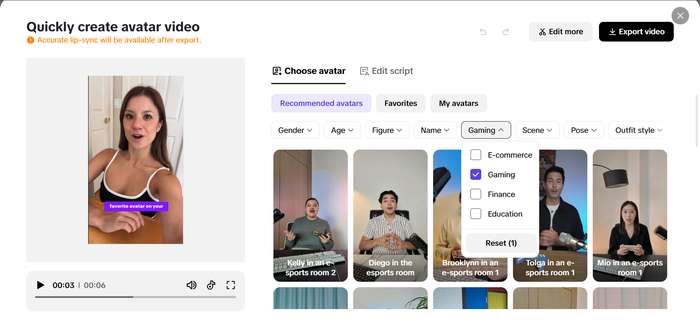
A yoga instructor might want a calm, soothing vibe. A coding coach could use an upbeat, energetic tone. The beauty of using an AI voice generator is that you can test voices until you find one that fits — and scale that tone across every single video.
2. Write like you speak
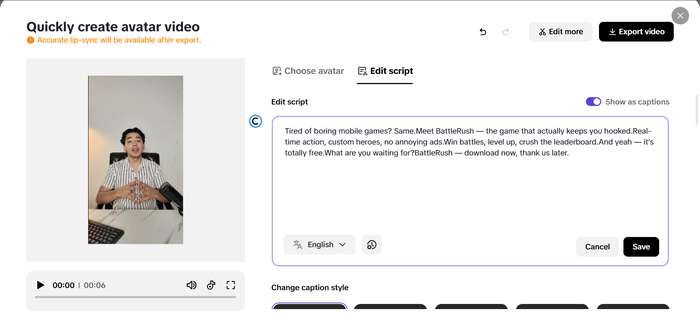
Ditch the academic script. Keep sentences short, use contractions, and throw in a few natural filler words or pauses. It’s okay if it’s not perfect grammar — it should sound like you.
3. Break up the info
Long text blocks lose people fast. Use natural breaks and pacing so each step or slide feels like its own mini “conversation.”
Types of tutorials that shine with AI narration
Wondering where to try this? Here are a few real-life ways educators and creators are adding voiceovers to their lessons:
Bite-sized online classes
Whether you’re teaching watercolor blending or basic Excel, adding a calm, encouraging narration helps students stay focused — especially if they’re watching at 1.5x speed!
App walkthroughs
SaaS brands and coaches love this one. Show your screen, highlight key clicks, and let an AI voice walk viewers through it step by step.
Guided demos and practice sessions
Fitness, wellness, meditation — they all benefit from a human touch. With AI voices, your instructions feel more like a real trainer’s guidance.
Product how-tos for e-commerce
Demo how to use a skincare product, assemble furniture, or style an outfit. A soft-spoken explanation beats silent subtitles any day.
Design tricks to keep your visuals fresh
Adding a great voiceover is half the battle, but your visuals should work just as hard. One simple trick? Clean, cut-out assets layered over eye-catching backdrops.
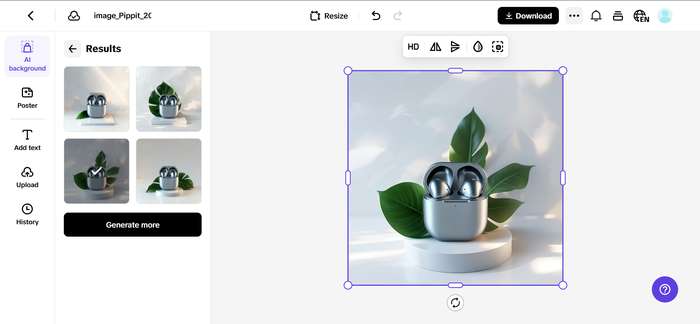
That’s why so many creators swear by Pippit's transparent background maker. It helps you:
- Remove messy backgrounds from product shots or icons.
- Layer your cut-outs over branded slides, seasonal colors, or UGC for extra personality.
- Keep viewers’ eyes on what matters most — your demo!
Pro tips for voiceover-ready tutorials
Want to really level up your videos? Keep these creator secrets in mind:
Use motion text sparingly:
Keep background music low:
Batch your scripts:
Test with your audience:
Real creators, real results
Creators who switch from silent slides to voice-narrated lessons often see:
- Higher average watch times.
- More saves and shares (hello, algorithm boost!).
- Stronger trust from students and fans.
- Less burnout — you don’t have to be “on mic” every day.
So if you’re serious about growing your educational or coaching brand, narration is more than a nice extra. It’s a must-have.
Scale your tutorials with Pippit
You don’t need to be a tech wizard or voice actor to make this work. With Pippit’s built-in tools, you can:
- Instantly generate high-quality narration with their AI voice generator.
- Keep your visuals crisp and professional with their transparent background maker.
- Match your voiceover to your brand tone every time, in any language.
No fancy equipment, no studio sessions. Just a few clicks — and your next how-to goes from “just slides” to “full conversation.”
Ready to turn your slides into stories?
Whether you’re teaching a global audience or hosting a niche community, your words deserve to be heard. Give your next lesson a voice that sounds just like you (or even better) — and watch your students tune in longer.
Try Pippit today and see how easy it is to transform your tutorials from dead air to dialogue!
Related Calculators

In case you have any suggestion, or if you would like to report a broken solver/calculator, please do not hesitate to contact us .