
PostgreSQL has become one of the world's most popular databases, but working without a good PostgreSQL viewer makes even simple tasks frustrating. Changing a single value means writing SQL instead of editing a cell, finding data takes longer than it should, and troubleshooting slow queries becomes guesswork.
To remove much of that friction, you need the right PostgreSQL tool. Some PostgreSQL viewers are built for quickly browsing and editing data, while GUI clients go further with SQL editing, AI-assisted development, schema comparison, query profiling, and administration features. The right choice often depends on how you use PostgreSQL.
This guide compares the best PostgreSQL viewers and GUI clients for 2026, covering their features, pricing, platform support, and where each one fits best.
What is a PostgreSQL viewer?
A PostgreSQL viewer is a graphical client for browsing schemas, viewing table data, running queries, and exploring database objects without living in the psql prompt. Some are little more than lightweight data browsers. Others grow into full PostgreSQL GUI clients with tools for development, administration, and performance tuning.
That's where the real difference is. A lightweight tool gives you a clean PostgreSQL UI, quick startup, and easy data editing. A more advanced one adds an intelligent SQL editor, schema and data comparison, query profiling, a visual query builder, reporting, and automation.
Quick list of the best PostgreSQL viewers
Here's a quick overview of the top picks before we look at each one in more detail:
- Full PostgreSQL management studio: dbForge Studio for PostgreSQL
- Free, official administration: pgAdmin
- Universal multi-database client: DBeaver
- Developer-focused IDE: DataGrip
- Premium commercial GUI: Navicat for PostgreSQL
- Lightweight, Mac-friendly viewer: TablePlus
6 Best PostgreSQL viewers and GUI clients
Here are six PostgreSQL viewers and GUI clients worth considering in 2026. Each one offers a different mix of features, platforms, and capabilities depending on how you work with PostgreSQL.
1. dbForge Studio for PostgreSQL

Best full PostgreSQL management studio
dbForge Studio for PostgreSQL is the closest thing here to a full workshop. SQL development, administration, schema and data compare, reporting, query profiling: it's all in one window instead of five apps. That makes it a natural pick for developers and DBAs tired of alt-tabbing between separate Postgres client tools.
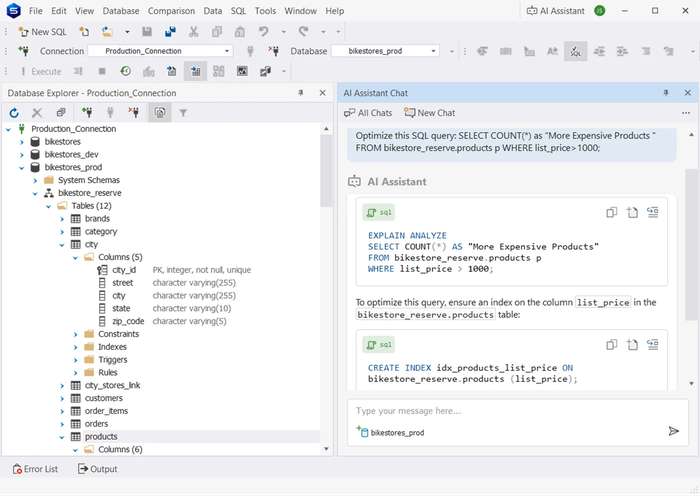
Features
- SQL editing and coding assistance (autocomplete, syntax check, formatting).
- Visual query builder and query profiler with execution plans.
- Schema compare and data compare with synchronization.
- Data import/export, pivot tables, and a report designer.
- Command-line automation for routine operations
- Integrated context-aware AI Assistant.
Pros
- Covers nearly every daily PostgreSQL development and admin workflow.
- Sharp SQL productivity: context-aware completion and formatting.
- Genuinely strong schema and data compare and sync.
- Visual query builder, query profiler, and a built-in AI Assistant.
Cons
- Standalone Studios are licensed per database engine, so multi-engine teams may need dbForge Edge, the unified solution for major RDBMSs and cloud services.
- English-only product localization.
- The free Express edition is deliberately pared back.
Price
Express is free. Standard starts at $89.95 per user/year and Professional at $139.95 per user/year, with perpetual licenses available too.
Compatibility
Native to Windows. dbForge Studio for PostgreSQL is not natively available for macOS and Linux, but it runs through CrossOver or Wine. It supports PostgreSQL and compatible services like Supabase, Amazon RDS, Aurora, Redshift, Azure Database for PostgreSQL, Google Cloud SQL, AlloyDB, Neon, Heroku Postgres, and TimescaleDB.
2. pgAdmin

Official free PostgreSQL admin tool
pgAdmin is the official one, the tool most PostgreSQL installs practically nudge you toward. It's free, open source, and thorough atF server administration and object management. For a free PostgreSQL GUI built around admin work, nothing else is quite as complete. Its one real weakness is the interface, which feels dated next to the commercial options, and it only speaks PostgreSQL.
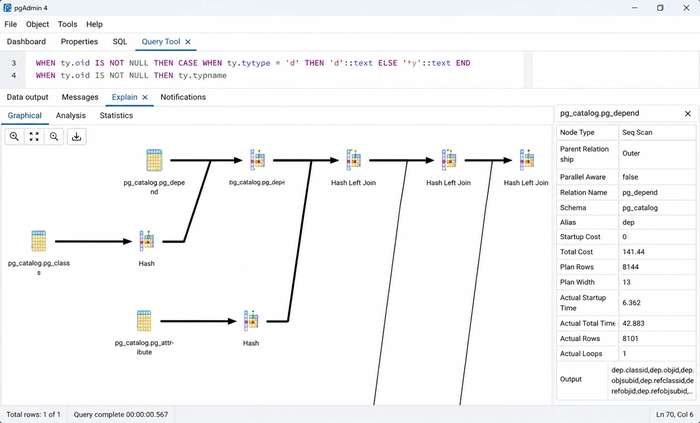
Features
- Object browser and full database management.
- Query tool with syntax highlighting, autocomplete, and graphical EXPLAIN.
- Backup and restore, plus role and user administration.
- Server dashboard and monitoring, and recent AI-assisted query analysis.
Pros
- Official PostgreSQL project, updated soon after new releases.
- Completely free and open source.
- Deep administrative capabilities.
- Runs as a desktop app, in Docker, or in the browser.
Cons
- Can drag on very large result sets.
- Thinner SQL productivity than commercial IDEs.
- No schema or data comparison.
Price
Free under the PostgreSQL License.
Compatibility
Windows, macOS, Linux, Docker, and browser-based deployments. Supports PostgreSQL exclusively.
3. DBeaver

Best free multi-database PostgreSQL client
If your day involves a mix of PostgreSQL, MySQL, SQL Server, Oracle or a pile of others, DBeaver is hard to beat. A free Community Edition, a uniform interface, and over 100 databases behind it, so it also works as a single Postgres client for a messy stack. The tradeoff is weight: If all you wanted to do was take a look at a table, it could feel heavy.
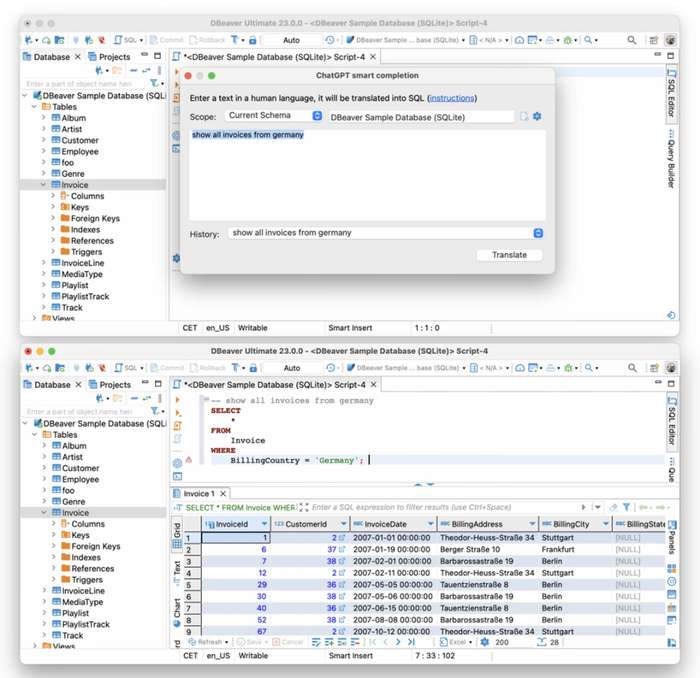
Features
- SQL editor with execution plans and editable result grids.
- Visual query builder and ER diagrams.
- Data import and export.
- Task scheduling and cloud connectivity in paid editions.
Pros
- Excellent multi-database support from one client.
- A capable, genuinely free Community Edition.
- Consistent experience across operating systems.
- Large plugin ecosystem.
Cons
- Heavier on memory than lightweight clients.
- Some enterprise features sit behind paid editions.
- PostgreSQL tooling isn't as deep as a dedicated postgres IDE.
Price
Community Edition is free. Paid editions start at around $113 per user/year.
Compatibility
Windows, macOS, and Linux. Supports PostgreSQL alongside 100-plus database systems through JDBC.
4. DataGrip

Best PostgreSQL IDE for developers
DataGrip is JetBrains' SQL IDE, built for people who write SQL all day rather than administer servers. The code intelligence is the draw: schema-aware completion, refactoring that understands your tables, and navigation that holds up on big schemas. Anyone already in the JetBrains world will feel at home in minutes.
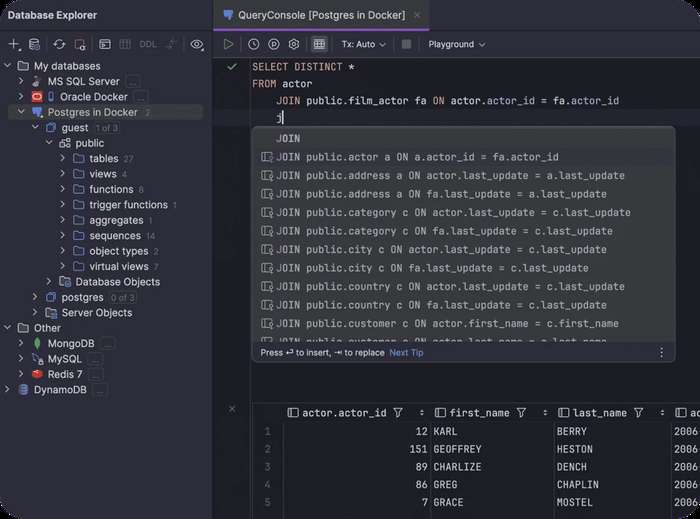
Features
- Schema-aware SQL code completion with advanced features.
- SQL refactoring and object navigation across the project.
- Query execution plans.
- Multi-database support and integration with version control.
Pros
- Good SQL editing and code intelligence.
- Schema-aware, context-aware code completion.
- Good schema navigation with SQL refactoring across the project.
- Excellent integration with the JetBrains ecosystem.
Cons
- Light on database administration.
- No built-in schema synchronization.
- First-time indexing can crawl on very large databases.
Price
Free for non-commercial use. Commercial licenses start at $10.90/month for individuals and $25.90/month for organizations.
Compatibility
Windows, macOS, and Linux. Supports PostgreSQL alongside more than 20 relational and NoSQL platforms.
5. Navicat for PostgreSQL

Best premium PostgreSQL manager
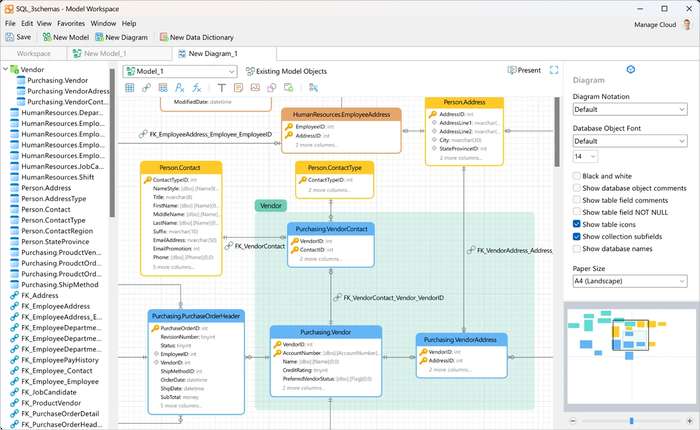
Navicat has been around forever and knows exactly what it is: a polished commercial postgresql gui aimed at administration, data modeling, and synchronization rather than raw SQL speed. Newer users find it approachable, and experienced DBAs lean on its visual modeling and sync tools. You pay for that polish, though.
Features
- SQL editor with code completion and execution-plan visualization.
- Visual query builder and data modeling / ER diagrams.
- Schema synchronization and backup/restore.
- Data transfer, import, and export.
Pros
- Strong visual database design and ER diagrams.
- Easy data transfer and schema synchronization.
- Clean, approachable interface for newcomers.
- Now ships AI-assisted SQL.
Cons
- One of the pricier options here.
- Sold per database engine.
- SQL productivity isn't as deep as a dedicated IDE.
Price
Paid plans start at $14.99/month or $149.99/year, with a $299 perpetual licence available. An Enterprise edition is also available.
Compatibility
Windows, macOS, and Linux with multi-platform licensing. It supports PostgreSQL and managed services like Amazon RDS, Amazon Aurora, Azure Database for PostgreSQL and Google Cloud SQL.
6. TablePlus

Best native PostgreSQL viewer for Mac users
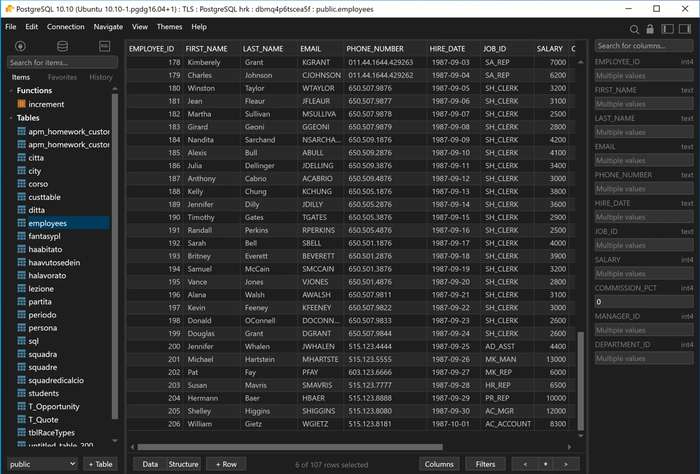
TablePlus is the one people go to when they just want speed. It opens in about a second, is smooth on large result sets, and feels native because it is, especially on MacOS. It's a pleasure to use as a Postgres DB viewer and everyday query tool, but it's not trying to be a full-fledged DBA suite.
Features
- Native SQL editor with multiple query tabs.
- Inline data editing and query snippets.
- SSH tunneling and SSL connections.
- Safe, read-only commit mode.
Pros
- Extremely fast startup, responsive on large databases.
- Clean native interface and excellent keyboard shortcuts.
- One-time perpetual license option.
- Handles other engines beyond PostgreSQL.
Cons
- License applies per device.
- No built-in schema comparison or query profiling.
Price
There's a free tier, capped at two open tabs and windows. A perpetual license is $99 one-time for one device (activatable on macOS, Windows, or Linux, with two bonus iOS activations).
Compatibility
macOS (the flagship build), Windows, iOS and Linux. Supports PostgreSQL plus MySQL, SQL Server, SQLite, Redis, and more.
Comparison table
A quick side-by-side of the six tools by main use case, platform support, and starting price.
| Tool | Best for | Platforms | Starting price |
|---|---|---|---|
| dbForge Studio for PostgreSQL | Full management studio / IDE | Windows, macOS, Linux | Free Express; Standard from $89.95/yr per user |
| pgAdmin | Free PostgreSQL administration | Windows, macOS, Linux, web | Free |
| DBeaver | Free multi-database client | Windows, macOS, Linux | Free Community; paid from $113yr per /user |
| DataGrip | Developer SQL IDE | Windows, macOS, Linux | Free non-commercial; $109/yr individual |
| Navicat for PostgreSQL | Premium admin & data modeling | Windows, macOS, Linux | Paid subscription starts at $14.99/month |
| TablePlus | Fast native viewer | macOS, Windows, iOS, Linux | Free tier; $99 one-time |
How to choose the best PostgreSQL viewer
The best PostgreSQL viewer is the one that fits the way you work, not the one with the longest feature list. If you mainly browse data, a lightweight Postgres client may be all you need. If you're comparing schemas, troubleshooting slow queries, or managing databases every day, you'll benefit from a more capable tool. Three things usually narrow the list: your workflow, your operating system, and your budget.
Match the tool to your workflow
Start with what you actually do. Browsing tables and editing data is simple enough for a viewer. SQL IDE: Intelligent editing and query development. The administration tools are more user, backup and server management oriented while the full IDEs combine development, administration, schema comparison and performance analysis in one environment.
If you're mostly browsing data, TablePlus is a good fit. DataGrip is aimed at developers who spend their day writing SQL. pgAdmin is strongest for administration, while dbForge Studio covers almost every stage of the PostgreSQL workflow.
Consider your platform
If your team works across different operating systems, cross-platform support becomes important. dbForge Studio, DBeaver, DataGrip, and pgAdmin all run on Windows, macOS, and Linux, while pgAdmin is also available through a web browser.
TablePlus offers its best experience on macOS, with Windows well supported and Linux still catching up. Navicat's cross-platform licensing is another advantage if you regularly switch between operating systems.
Think about your budget
You don't always need a paid tool. pgAdmin, DBeaver Community, and the Express edition of dbForge Studio cover the needs of many developers and DBAs.
Paid editions start to make sense when you need features such as schema and data comparison, query profiling, reporting, automation, collaboration, or commercial support. DataGrip takes a slightly different approach, remaining free for non-commercial use before moving to a commercial subscription.
Takeaway: Which PostgreSQL viewer should you choose?
So which one? If you want a single PostgreSQL GUI that handles development, administration, comparison, and reporting without hopping between apps, dbForge Studio for PostgreSQL is the pick. Want free? pgAdmin owns administration and DBeaver owns multi-database work. If you basically live in SQL, go DataGrip.
If you want a commercial tool for modeling and admin, Navicat fits. And if you mostly need a fast Postgres DB viewer to browse and edit, TablePlus or the free, open-source Beekeeper Studio will do the job nicely. Decide whether you need a viewer, a developer IDE, or a full studio, and the rest gets easy.
Related Calculators
 Graphing Tools - MathCracker.com
In case you have any suggestion, or if you would like to report a broken solver/calculator, please do not hesitate to contact us .